
NoteWave 2.7: Build Better Minutes From More Than One Source
Real meetings are rarely captured in one perfect file.
A meeting might be recorded in two parts. Someone may have taken rough notes. There may be an agenda explaining what was supposed to be discussed, previous minutes showing what carried forward, and supporting documents containing details that matter to the final record.
Turning all of that into useful meeting minutes has traditionally meant piecing the context together manually.
NoteWave 2.7 is built around a more realistic workflow.
The biggest change is an expanded Minutes experience that can bring multiple sources together, generate the right type of document, and give users more control over reviewing, refining, and finalising the result.
The update also improves recording reliability, recovery, processing feedback, and several everyday parts of the NoteWave interface.
The central idea is simple:
Better meeting minutes begin with better context.
Meeting Minutes Do Not Always Start With One Recording
The cleanest meeting workflow is easy to imagine.
Record the meeting. Generate the transcript. Create the minutes.
Real work is not always that tidy.
A recording may have stopped halfway through and restarted. Someone may already have written detailed notes. The meeting may follow an agenda that gives useful structure. Previous minutes may contain unresolved matters that need continuity. An external transcript or supporting document may contain additional context.
NoteWave 2.7 allows more of that information to become part of the minutes workflow.
Instead of treating one recording as the only possible source, users can bring together multiple existing NoteWave recordings and supported text or document sources when creating a minutes document.
That means the final record can begin with the context you actually have, rather than requiring everything to exist inside one perfectly captured meeting.
Bring the Meeting Context Together
Different sources serve different purposes.
A current recording, transcript, or set of rough notes helps establish what happened in the meeting.
An agenda can provide the planned structure of the discussion.
Previous minutes can provide continuity, including matters that were still open before the current meeting.
Additional notes or documents can provide useful supporting context.
These sources should not all be treated as equivalent.
An agenda can show what was intended for discussion, but it cannot prove that a decision was actually made.
Previous minutes can explain what happened last time, but they cannot establish the outcome of the current meeting.
The current meeting record remains the most important source for determining what was actually discussed, decided, assigned, or left unresolved.
That distinction helps NoteWave use more context without confusing planned business with actual outcomes.
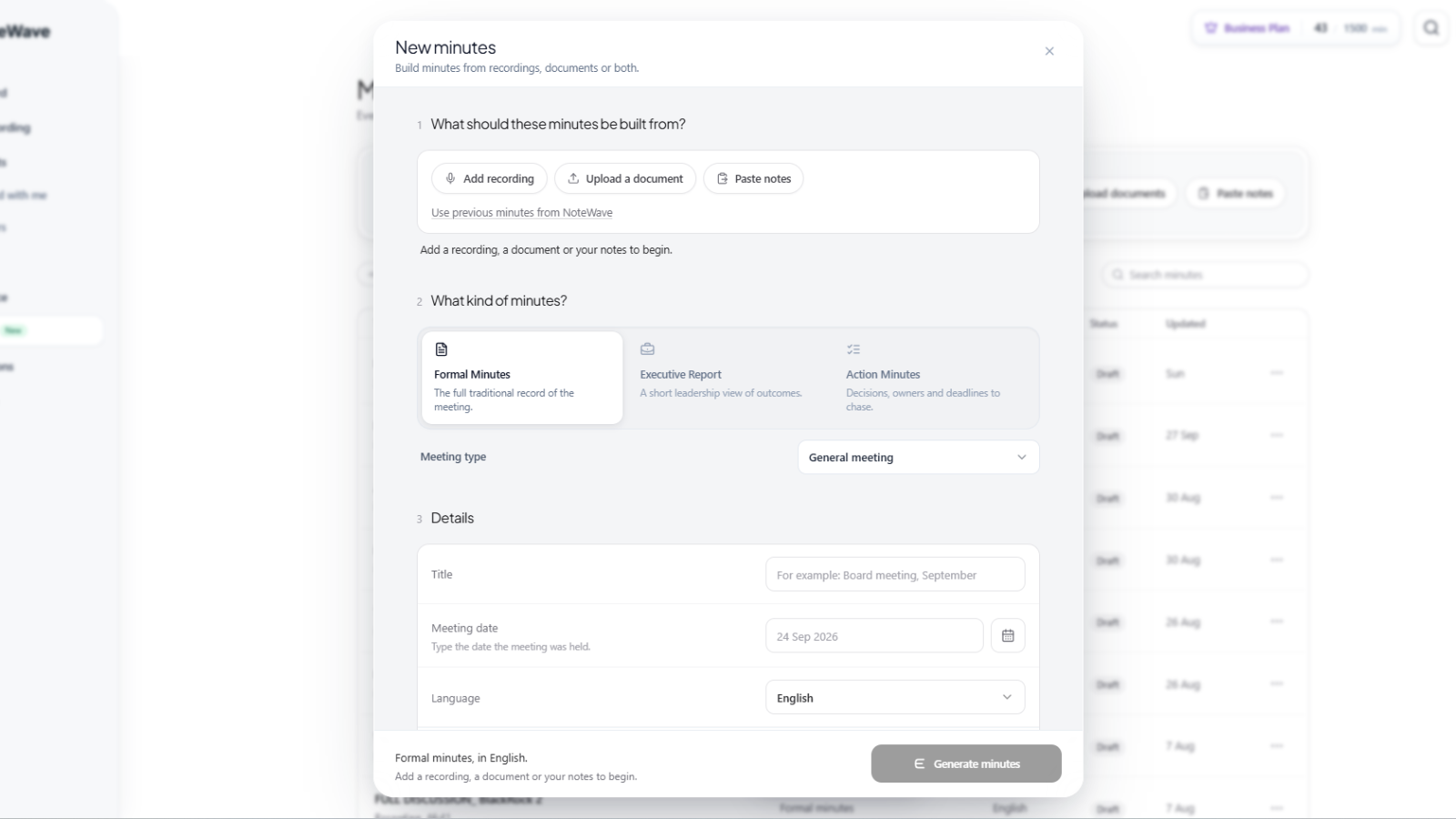 NoteWave 2.7 creating meeting minutes from recordings, documents and notes
Build From Multiple Recordings
One of the most practical changes in NoteWave 2.7 is the ability to create one minutes document from multiple existing NoteWave recordings.
This is useful when:
- a meeting was recorded in separate parts
- the recording was intentionally stopped and restarted
- different sections of a longer session exist as separate meetings
- the complete meeting context is spread across more than one NoteWave record
Users can select the relevant recordings and generate one document from the combined meeting context.
The goal is not to pretend those recordings were one continuous file.
It is to help produce one useful final record when the real meeting happened across several captured parts.
You Can Start With Rough Notes Too
Not every meeting has a recording.
Sometimes the only source is a page of rough notes.
Those notes do not need to look like finished minutes before NoteWave can work with them.
They can contain:
- discussion points
- decisions
- names
- action items
- deadlines
- incomplete sentences
- shorthand
- copied text from another meeting record
As long as the notes contain enough information about what actually happened, NoteWave can use them as the basis for a structured minutes document.
This makes the workflow useful for meetings that were not recorded, older meeting records, or situations where someone already captured the important details manually.
You can also combine current meeting information with supported document and text sources such as agendas, previous minutes, external transcripts, and supporting notes.
The aim is not to reproduce an arbitrary company template exactly.
It is to give the AI enough reliable context to build a stronger first draft.
Choose the Record the Meeting Actually Needs
More context is only useful if the final document is also suitable for its audience.
NoteWave continues to support three main minutes formats:
- Formal Minutes for structured meetings that need an organised formal record
- Executive Report for leaders who need the main outcomes, risks, implications, and decisions requiring attention
- Action Minutes for operational meetings where owners, deadlines, blockers, and next steps matter most
Formal Minutes can also be shaped around common meeting types, including general or committee meetings, board meetings, shareholder AGM or EGM meetings, School Governing Body meetings, and body corporate AGM or trustee meetings.
If you are unsure which format fits the meeting, see Meeting Minutes: How to Choose the Right Format for Every Meeting.
Shape the Draft Before You Generate It
The source material tells NoteWave what happened.
The generation settings help determine what the final document should look like.
Users can choose:
- the output language
- a concise, balanced, or detailed document
- an appropriate formal or professional tone
- standing instructions used across documents
- additional instructions specific to the current minutes
For example, a user might ask the document to:
- emphasise unresolved risks
- list every confirmed deadline
- provide more context around important decisions
- separate recommendations from final decisions
- keep the report concise for leadership
- follow terminology normally used by the organisation
The same source material can therefore produce different useful records depending on who needs to read it and why.
NoteWave's broader AI Meeting Minutes workflow is built around this review-first approach rather than treating the first AI output as automatically final.
A Practical Example
Imagine a management meeting that was recorded in two parts.
The first recording contains the project review and discussion of a delayed deadline. The second contains the final decision, supplier concerns, and follow-up responsibilities.
The organiser also has:
- rough notes taken during the meeting
- the meeting agenda
- previous minutes containing an unresolved supplier matter
Instead of manually comparing all of those sources while writing the minutes, the organiser can bring the relevant material into the NoteWave minutes workflow.
They might:
- Select both NoteWave recordings.
- Add the current rough notes.
- Add the agenda to provide the planned meeting structure.
- Include the previous minutes for continuity.
- Choose Formal Minutes, an Executive Report, or Action Minutes.
- Select the language, detail level, tone, and document instructions.
- Generate the first draft.
- Review names, figures, decisions, responsibilities, and deadlines.
- Refine anything that needs more clarity.
- Finalise and export the finished document.
The value is not simply that AI wrote the minutes.
The value is that the draft started with more of the context the organiser would otherwise have needed to reconcile manually.
From AI Draft to Final Record
Generating the first document is still only the beginning.
The Minutes experience gives users tools to work with the draft directly.
Headings and passages can be edited. Responsibilities and deadlines can be corrected. Decision rationale can be clarified. Passages can be inserted or removed when the document needs more or less context.
Echo can also help refine sections using the available source material.
A user might ask Echo to:
- make a passage more concise
- clarify why a decision was made
- expand a section using the meeting context
- make wording more formal
- clarify an action owner
- strengthen the explanation of a risk
- restructure part of the document
The aim is to make refinement easier without disconnecting the final record from its underlying meeting context.
Review What May Need Attention
AI can organise a large amount of meeting information quickly, but important minutes still require judgement.
NoteWave 2.7 strengthens the review process by helping surface details that may deserve another look, such as:
- possible omissions
- unnamed speakers
- actions without clear owners
- information that may require confirmation
Users should still verify the details that matter most.
That includes:
- names and titles
- dates
- figures
- decisions
- resolutions
- action owners
- deadlines
- sensitive statements
Echo and review checks assist with this process. They do not certify that a document is legally compliant or factually perfect.
The organisation remains responsible for the final record.
Version History Makes Refinement Safer
Editing an important document often involves trying different wording, restoring context, or reconsidering an earlier change.
Version history makes that process easier to manage.
Users can inspect changes, return to an earlier version where necessary, and compare the evolving document with the original AI draft.
This gives the editing process more structure than repeatedly overwriting the same document and hoping nothing important was lost.
Finalise When the Wording Is Ready
Once the document has been reviewed, it can be finalised.
Finalisation locks the wording so the record is no longer being casually edited.
If another change becomes necessary, the document can be reopened as a draft.
Both draft and finalised versions can be exported, including PDF and Word formats.
Finalising a document is not an electronic signature or formal organisational approval process.
It is a document-state control inside NoteWave that helps distinguish work still being edited from wording that has been deliberately finalised.
Create Another Version in Another Language
The same source material may need to serve different audiences.
NoteWave can generate another document from the same sources using a different output language.
That can be useful for organisations operating across multilingual teams, committees, clients, or regions where the meeting record needs to be available in more than one language.
The original source context remains the foundation, while the output can be adapted for the people who need to read it.
Branding Still Fits Into the Workflow
Eligible Business and Enterprise users can apply supported business branding to meeting minutes, including the company name, logo, confidentiality label, and footer text.
Branding itself is not new in NoteWave 2.7.
What changes is the broader workflow around it.
A document can now begin with richer source context, move through a more structured review and refinement process, and still end as a professional PDF or Word record carrying the organisation's branding.
 NoteWave 2.7 improving the workflow from meeting capture to finished minutes
A More Reliable Recording Workflow
Minutes are only one part of NoteWave 2.7.
The update also includes several changes aimed at making meeting capture and processing more dependable.
These include improvements around:
- recording checkpoints
- recovery from interrupted recordings
- microphone testing
- recovery of saved transcripts and summaries
- audio backup handling
- clearer processing messages when contact with the server is interrupted
The goal is not to claim that recordings can never fail.
Real-world recording still depends on devices, browsers, networks, microphones, and other conditions outside any one system's control.
The improvements are designed to make NoteWave more resilient when something does go wrong and clearer about what has already been saved.
Clearer Feedback When Processing Is Interrupted
One particularly confusing situation with meeting software is losing server contact after a meeting has already been captured.
It can look as though the entire meeting disappeared when the underlying recording may already have saved successfully.
NoteWave 2.7 improves the messaging around these states so users have a clearer understanding of what is happening and what may still be recoverable.
That is a small change compared with the expanded Minutes workflow, but it matters during the moments when users need clarity most.
A Cleaner Experience Across NoteWave
The update also includes usability and interface improvements across several parts of the product.
Areas receiving additional polish include:
- the dashboard
- analytics
- folders
- team and workspace screens
- transcript interactions
- authentication screens
- responsive layouts across different screen sizes
There are also general bug fixes and reliability improvements throughout the platform.
The objective is not to change how every part of NoteWave works.
It is to make the experience feel more consistent as the platform continues growing beyond transcription into meeting knowledge, follow-up, and formal meeting records.
A Few Boundaries That Matter
The expanded Minutes workflow is deliberately flexible, but a few distinctions are worth understanding.
Minutes created from multiple recordings or from standalone notes and documents are private standalone records belonging to their owner.
They are different from minutes linked directly to one meeting, where the meeting's supported access permissions can apply.
When eligible plan requirements are met, selected actions from a finalised recording-linked document can also be added to tracked Tasks.
Supporting documents provide context, but they do not replace evidence of what happened in the current meeting.
An agenda alone cannot establish a decision. Previous minutes alone cannot establish a new outcome.
And regardless of the source combination, human review remains necessary before important minutes are relied upon or circulated.
Why NoteWave 2.7 Matters
NoteWave 2.6 focused on making meeting knowledge easier to search, organise, and act on through Echo 2.0, Workspace, and Folders. Read the NoteWave 2.6 update.
NoteWave 2.7 moves further into the meeting record itself.
The underlying idea is that important minutes should not depend on having one perfect recording and one fixed generation workflow.
A meeting can have multiple recordings.
The organiser can have rough notes.
An agenda can provide structure.
Previous minutes can provide continuity.
Supporting documents can add useful context.
AI can bring those sources together, but people still decide what belongs in the final record.
That combination is what makes the workflow more useful.
Final Thoughts
Meeting minutes are often created from imperfect inputs.
Recordings stop and restart. Notes are incomplete. Context lives in last month's document. The agenda explains the structure, but not necessarily what was decided.
NoteWave 2.7 is designed around that reality.
Bring the relevant context together. Choose the right type of record. Generate a strong first draft. Review the details that matter. Refine the wording. Keep the version history. Finalise when the document is ready.
And when the meeting itself does not go perfectly, the recording and recovery improvements are designed to make the wider workflow more dependable too.
NoteWave 2.7 is another step towards making the path from conversation to useful meeting record more flexible, more reviewable, and easier to manage.
Explore the NoteWave AI Meeting Minutes workflow to learn more.